DOCKER ARCHITECTURE | HOW IT WORKS ?
Автор: Tech With Machines
Загружено: 2024-05-29
Просмотров: 127
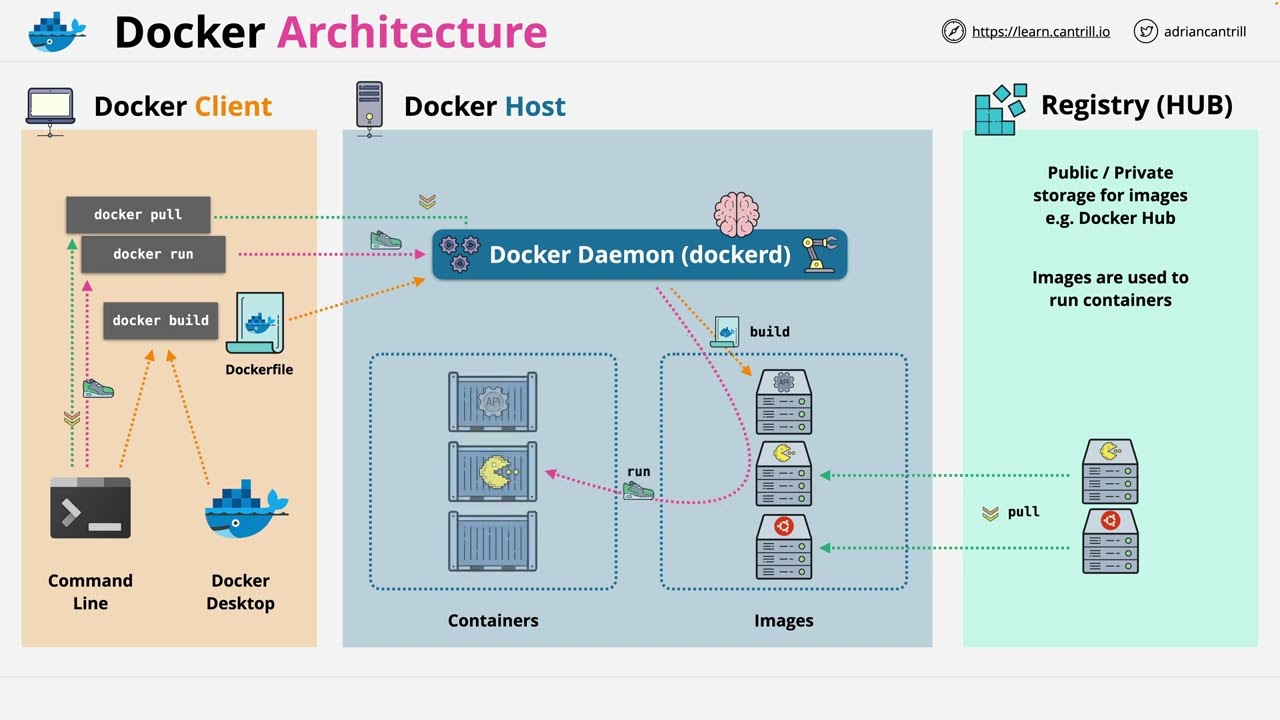
Docker’s architecture is based on a client-server model that efficiently manages the lifecycle of containerized applications. At its core, Docker allows applications to be packaged into containers, providing a lightweight, consistent, and portable execution environment. The key components of Docker architecture include:
1. Docker Client
The Docker client is the command-line interface (CLI) that users interact with to issue Docker commands like docker build, docker run, and docker stop. These commands are sent to the Docker daemon through a REST API. The client can interact with the daemon either on the same machine or a remote server.
2. Docker Daemon (dockerd)
The Docker daemon is the core service that manages containers, images, networks, and storage. It listens for Docker API requests and performs actions like container creation, image building, and resource management. The daemon handles all operations related to containers and communicates with container runtimes (e.g., containerd), which manage low-level container execution.
3. Docker Images
Docker images are read-only templates used to create containers. These images include everything needed to run an application—code, libraries, environment variables, and configuration files. Images are layered, meaning each layer represents a change (like installing software). This layering allows for reusability and efficiency because Docker can cache layers and only download or rebuild layers that have changed.
Images are built using a Dockerfile, which contains a set of instructions specifying how to assemble an image. For example, a Dockerfile might use a base image like ubuntu, add application code, and define the default command for the container.
4. Docker Containers
Containers are the runtime instances of Docker images. They provide isolated environments for running applications, sharing the host OS kernel but maintaining separation between processes, file systems, and networks. Each container runs as an isolated process on the host machine, and multiple containers can run simultaneously without interfering with each other.
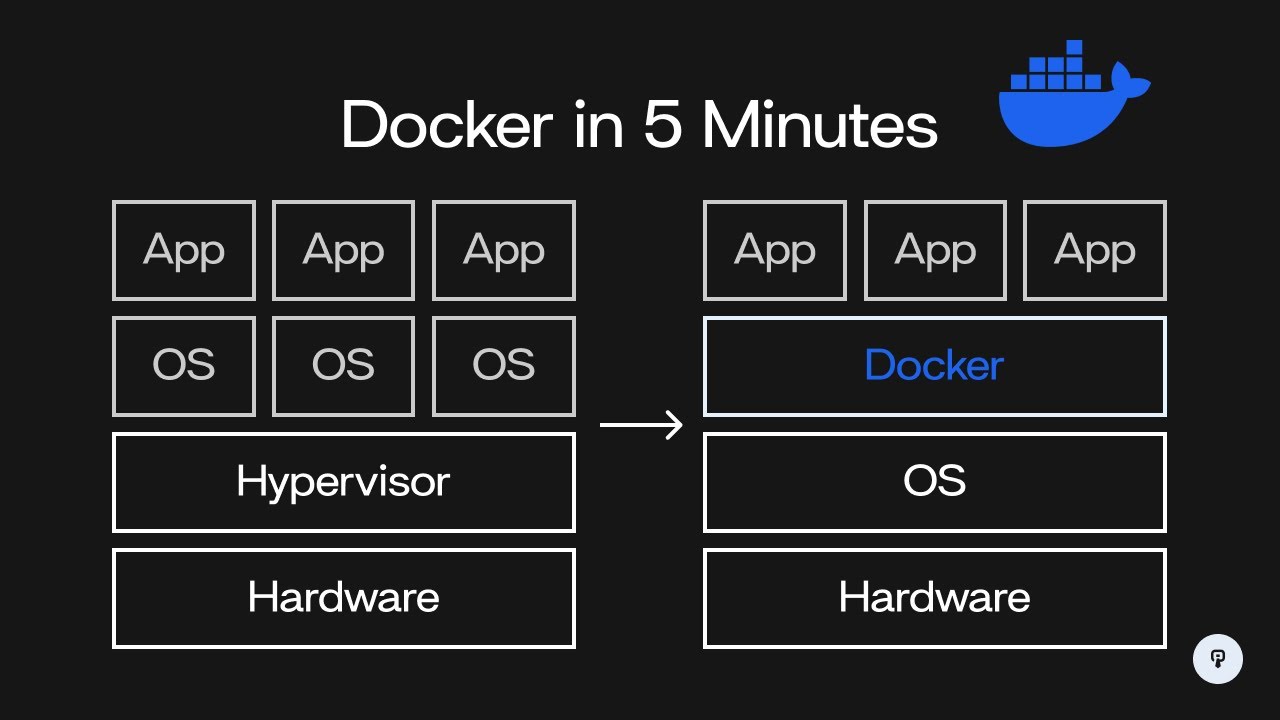
Containers are lightweight, start quickly, and use fewer resources than traditional virtual machines (VMs) because they don’t need a full OS; they share the host’s kernel. This makes Docker ideal for microservices, CI/CD pipelines, and scalable cloud-native applications.
5. Docker Registry (Docker Hub)
A Docker registry is a storage system for Docker images. Docker Hub is the default public registry, which hosts thousands of official and user-contributed images. Developers can pull images from the registry to create containers or push custom-built images to share them with others. Private registries can also be set up to store proprietary images.
6. Docker Networking
Docker provides several networking models to enable communication between containers and the outside world. Containers can communicate within the same host using the default bridge network or across different hosts using overlay networks. Networking modes include:
Bridge (default for container communication within a single host),
Host (direct use of host networking),
Overlay (for multi-host communication in swarm mode).
7. Storage (Volumes)
To persist data beyond the container’s lifecycle, Docker uses volumes. Volumes allow data to be stored outside the container’s filesystem, ensuring it remains available even if the container is removed. Volumes are more flexible and preferred over bind mounts, which directly map host directories into containers.
Conclusion
Docker’s architecture simplifies application deployment by encapsulating applications and their dependencies in isolated containers. This design provides portability, resource efficiency, and consistency across different environments, making Docker a powerful tool for modern software development and operations. @TechWithMachines
#docker
#devops #dockerarchitecture #kubernetes #aws #linux #python #jenkins #cloudcomputing #git #cloud #devopsengineer #coding #stevedore #ansible #java #programming #azure #javascript #containership #github #longshoreman #developer #technology #container #ilwu #craneoperator #portoflb #portoflongbeach #software #googlecloud #dockercontainer #dockerhub #dockertraining #dockertutorial #dockerbasics #kubernetestutorial #systemdesign #microservices #terraform #awscloud #devopstools #containervessel #devopstraining #port #movingcontainers #tech #crane #devopscommunity #sre #devsecops #containerships #containershipping #cybersecurity #developers #gcp #msc #plc #konecranes #nodejs #security #cloudcomputing #git #google #dev #javascript #microsoft #development #programming #tecnologia #coding #code #software #containers #craneoperator #craneoperating
Доступные форматы для скачивания:
Скачать видео mp4
-
Информация по загрузке:

![Docker Crash Course for Absolute Beginners [NEW]](https://imager.clipsaver.ru/pg19Z8LL06w/max.jpg)