Популярное

Музыка Кино и Анимация Автомобили Животные Спорт Путешествия Игры Юмор

Интересные видео

2025 Сериалы Трейлеры Новости Как сделать Видеоуроки Diy своими руками

Топ запросов

смотреть а4 schoolboy runaway турецкий сериал смотреть мультфильмы эдисон
dTub
Скачать

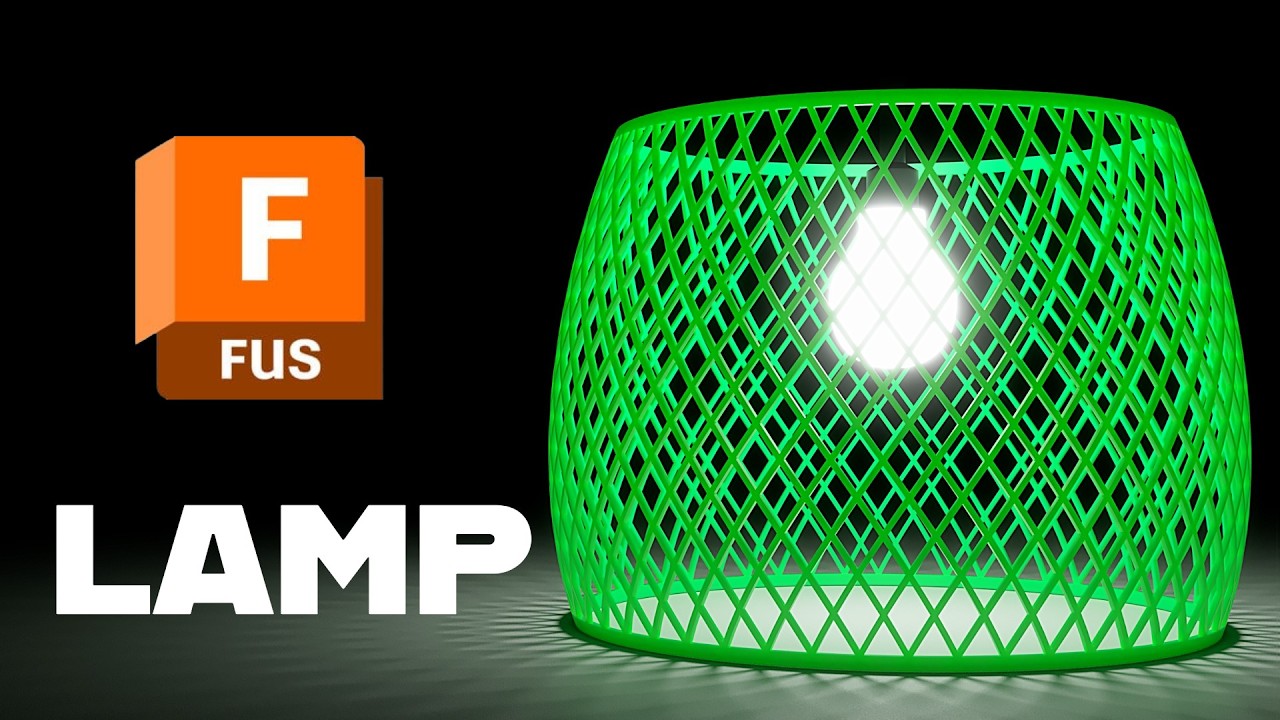
Parametric Spiral Lampshade in Fusion: Revolve Intersect, Mirror, Circular Pattern

Автор: What Make Art

Загружено: 2026-01-26

Просмотров: 637

Описание:

Learn how to model a spiral, lattice-style lampshade in Autodesk Fusion (Fusion 360) using Surface Tools and a clean parametric workflow that is ready for 3D printing. You will set up offset construction planes, build a twisted surface loft, thicken it for printability, then use Revolve with Intersect to carve the final form. After that, you will mirror and circular-pattern the bodies to create the repeating spiral look, and finish by lofting a stronger top and bottom rim.

This tutorial is ideal if you want a customizable, 3D printed lampshade design where you can easily tweak height, twist angle, wall thickness, and pattern density.

Chapters

00:00 Intro: spiral lampshade for 3D printing with Surface Tools
00:14 Create offset planes for bottom reference, height, and top reference
00:57 Top reference setup and sketch basics
01:02 Sketch guide lines and set the 60 degree twist angle
01:50 Surface Loft between lines to create the thin twisted surface
02:06 Thicken the surface to a printable wall thickness (2 mm total)
02:24 Sketch the lampshade profile with a spline and offset it (2 mm)
03:15 Revolve with Intersect to keep the thin spiral segment
03:41 Split Body using top and bottom planes, then remove extra bodies
04:23 Mirror the body to create the paired spiral element
04:42 Circular Pattern (bodies) around the center axis for the lattice
05:11 Decide on pattern density (example: 50 instances)
05:29 Build the top rim: project edge, circles, offset, and loft as Join
06:43 Cut the inner void at the top using a second loft
07:41 Repeat the rim process on the bottom (loft Join, then loft Cut)
09:06 Final result: fully joined, parametric spiral lampshade ready to print

Key parameters shown in the video

Lampshade height plane: 200 mm
Twist angle: 60 degrees
Thicken: 1 mm per side (2 mm total)
Circular pattern example: 50 instances
Rim offsets: negative 3 mm (for added strength)

3D printing note:
Use an LED bulb to reduce heat, and choose a material suitable for your lamp environment. Test fit your socket hardware before printing the final version.

If you build your own variation, share what you changed (height, twist angle, number of pattern instances, rim thickness) and how it printed.


#fusion360
#autodeskfusion
#3dprinting
#cad
#parametricdesign
Parametric Spiral Lampshade in Fusion: Revolve Intersect, Mirror, Circular Pattern

Поделиться в:

Доступные форматы для скачивания:

Скачать видео mp4

  • Информация по загрузке:

Скачать аудио mp3

Похожие видео

Перестань переделывать модели: используй параметры | Урок Autodesk Fusion

Перестань переделывать модели: используй параметры | Урок Autodesk Fusion

Fusion 360 Loft Tutorial: Loft Between Profiles + Intersect for Complex Shapes*

Fusion 360 Loft Tutorial: Loft Between Profiles + Intersect for Complex Shapes*

Правило номер один для начинающих по Fusion 360. Учебное пособие

Правило номер один для начинающих по Fusion 360. Учебное пособие

Действительно ли угловая 3D-печать делает детали прочнее?

Действительно ли угловая 3D-печать делает детали прочнее?

3D Printing Machine Parts with Carbon-Fiber Nylon | NylonX

3D Printing Machine Parts with Carbon-Fiber Nylon | NylonX

Fusion 360 для новичков: Твоя первая 3D модель. С чего начать 3D моделирование

Fusion 360 для новичков: Твоя первая 3D модель. С чего начать 3D моделирование

Я создал звуковой лазер

Я создал звуковой лазер

Autodesk Fusion Tutorial: Model a Screwdriver with Revolve, Fillets, and Circular Patterns

Autodesk Fusion Tutorial: Model a Screwdriver with Revolve, Fillets, and Circular Patterns

Fusion 360 для новичков: Твоя первая 3D модель. С чего начать 3D моделирование

Fusion 360 для новичков: Твоя первая 3D модель. С чего начать 3D моделирование

Unbelievable Workers | Working with Talented Engineers. EP14 #construction #adamrose #workers #smart

Unbelievable Workers | Working with Talented Engineers. EP14 #construction #adamrose #workers #smart

На меня напали… Розыгрыш в спортзале «Анатолий» пошел не так… | Притворился уборщиком

На меня напали… Розыгрыш в спортзале «Анатолий» пошел не так… | Притворился уборщиком

Мебельная фурнитура которую вы не поняли

Мебельная фурнитура которую вы не поняли

Don’t Throw Away Old Spray Paint Cans! An Easy Way to Refill an Empty Spray Can

Don’t Throw Away Old Spray Paint Cans! An Easy Way to Refill an Empty Spray Can

Создание сложных эскизов и многократное зеркальное отображение в FreeCAD — Учебное пособие по Fre...

Создание сложных эскизов и многократное зеркальное отображение в FreeCAD — Учебное пособие по Fre...

Step Up Your Game in Autodesk Fusion

Step Up Your Game in Autodesk Fusion

😺 Потрясающе смешные видео с кошками и котятами! 🐈 Новая подборка приколов! 😸

😺 Потрясающе смешные видео с кошками и котятами! 🐈 Новая подборка приколов! 😸

Autodesk Fusion Tutorial: 3D Printed Pipe Flange Mount for 1 Inch Schedule 40 PVC

Autodesk Fusion Tutorial: 3D Printed Pipe Flange Mount for 1 Inch Schedule 40 PVC

Fusion — пустая трата времени

Fusion — пустая трата времени

How to Build a Realistic Vespa Scooter : Step-by-step Guide | Miniature ASMR Build!

How to Build a Realistic Vespa Scooter : Step-by-step Guide | Miniature ASMR Build!

Fusion 360 Emboss - Wrap sketches on round or curved objects

Fusion 360 Emboss - Wrap sketches on round or curved objects

© 2025 dtub. Все права защищены.


  • Контакты
  • О нас
  • Политика конфиденциальности


Контакты для правообладателей: infodtube@gmail.com